
Sky Exchange Demo Login Strip: Free Practice Balance First
The practice balance comes from the Demo login button on the official screen; a real ID later goes through the ID desk. 18+ only.Sky Exchange Demo ID: Safe Practice ID for Cricket and Lobby Games
Practise first: the Demo login button on the official Sky Exchange screen hands you a practice balance without any deposit. Use it to learn back and lay on a cricket market, then try two small practice rounds right here in your browser.

One button, no deposit
Sky Exchange Demo ID on the Official Screen: Empty Fields, One Free Tap
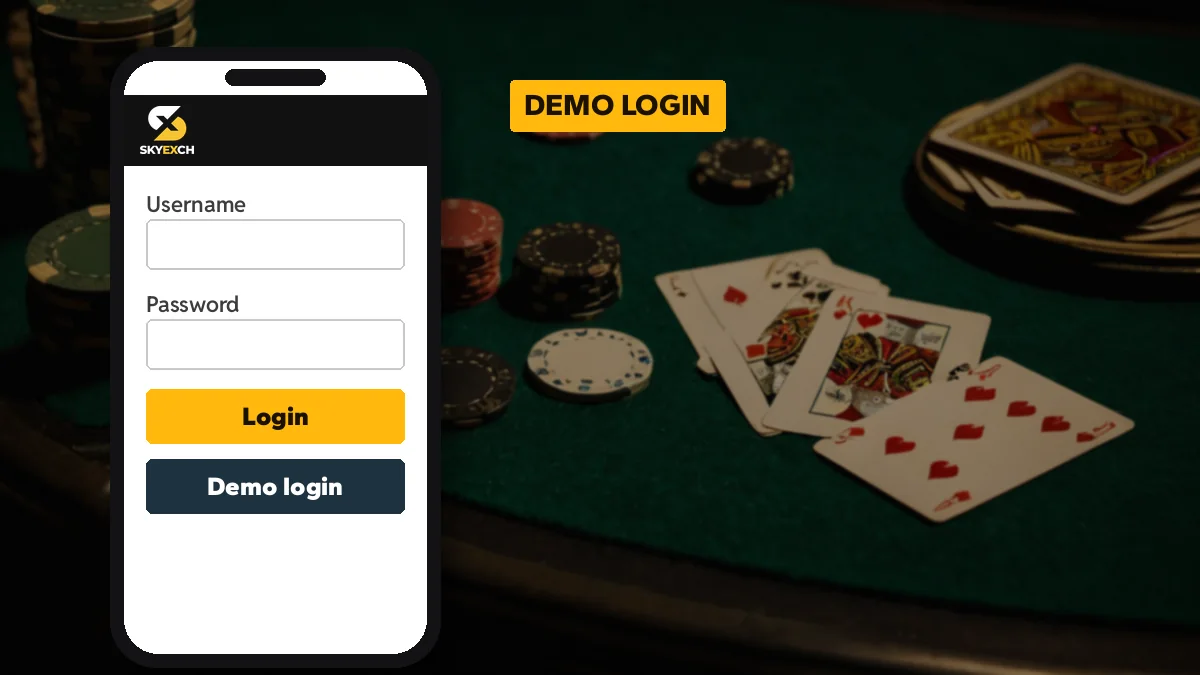
Most first visits to Sky Exchange go wrong the same way. Someone types a made-up username, gets an error and gives up, while the practice entry sat one button lower the whole time, labelled Demo login.
Tap it. The lobby opens with a practice balance already loaded, no deposit asked, no WhatsApp chat needed, and you can move around the Sky Exchange sports nav, open a cricket market, see how the back and lay columns sit side by side, and put a practice amount on the bet slip to watch how it behaves before any real money is involved.
On a laptop the layout shifts a little. The same three fields move into the top header bar, with Login and Demo buttons sitting next to them, so you never scroll down to find the practice entry. Same balance idea, different spot.
People call this a Sky Exchange demo ID, though strictly it is a shared practice session rather than an ID issued in your name. That matters later (more on it in the comparison table below), because nothing you do in demo carries over to a real account.
Want a feel for the speed of a coin game before you even open Sky Exchange? This round runs only in your browser, uses no real money and stores nothing.
Call the coin before the captains walk out.
Practice only: no money, nothing stored, nothing paid.
Flip a practice coin, then open Demo login on Sky ExchangeWhat the Sky Exchange Demo Shows: Real Lobby, Live Markets, Practice Money
A Sky Exchange demo session is the real lobby with pretend money in it. Here is roughly what you get to see, row by row.
- Sports nav
- Every Sky Exchange sport opens, from Cricket and Kabaddi to Politics and GreyHound, and In-play plus Multi Markets behave much as they would on a funded ID.
- Market tabs
- FancyBet, SportsBook and Binary sit above a match, so you can compare how each Sky Exchange market type is laid out.
- Back and lay
- The two price columns on every Sky Exchange runner. Tap the wrong one in demo and nothing is lost.
- Bet slip
- The demo is the only place on Sky Exchange to watch Matched bets and Book Position fill in without paying for the lesson.
- Settings drawer
- People ignore Accept Any Odds and Quick Stakes on a funded ID until a bad price costs them; here you flip each switch and see what it changes on the next practice bet.
- Casino tiles
- The lobby lists Coin Toss, Dragon Tiger, Aviator, Teen Patti 20-20, Andar Bahar and more; which tables accept a demo balance is hard to say until you tap one.
Spend ten minutes on the Settings drawer alone. Most new Sky Exchange users only learn what Accept Any Odds does after a real bet gets matched at a price they did not expect, and the demo lets you make that mistake for nothing. For the full walk through a real bet slip, the Sky Exchange bet page covers it step by step.
What a Sky Exchange Demo ID Cannot Do: No Real Withdrawals, No Saved History
Picture a practice balance that has tripled over one evening of cricket. On Sky Exchange that figure is decoration; there is no linked bank, no ID in your name, nowhere for it to go.
That is the rule in plain terms. In practice it trips people up in two ways: they win big in demo and assume the same luck carries over, or they message the ID desk asking to cash out a demo screen. Neither works. A real Sky Exchange withdrawal only goes to the bank account linked to a real ID, by UPI or bank transfer through the the desk, and the Sky Exchange withdrawal page explains that route.
The demo also does not remember you. There is no username, so no bet history, no saved stake settings, nothing to log back into tomorrow. Short sessions.
Sky Exchange Demo Login in Easy Steps, From Address to First Practice Bet
On a phone, this order gets you from a blank screen to a matched practice bet.
- Get an address your network allows. Your ISP may stop one Sky Exchange ending and let another through, so ask the desk before you spend twenty minutes reloading a dead mirror.
- Type nothing. The 4-digit Validation code keeps changing on each load; for practice it does not matter, and neither do the Username and Password boxes.
- Tap Demo login. It sits below the Login button on mobile, and beside it in the header bar on desktop. The lobby loads with a practice balance.
- Go to cricket, not casino. The first instinct is the casino tiles; resist it for now. Cricket in the sports nav (or In-Play, if a match is on) is where the exchange half of Sky Exchange actually lives.
- Stake something silly. Put a large practice amount on one price and confirm. Once it lands under Matched bets, you have seen the whole Sky Exchange cycle once.
- Change one setting. Open the Settings drawer, edit the Quick Stakes buttons, and place a second practice bet to see the difference.
If Demo login does nothing, the mirror you opened is probably the problem rather than your phone; ask the desk for a fresh Sky Exchange address and try again, because a page that that opens with a very small or blank screen on one ending is often fine on another. Mobile users also get the fixed bottom bar with Games, Sports, In-Play, Home, Multi Markets and Account, which is the quickest way around in demo. The Sky Exchange login page shows the same screen with every field named.
Where a Sky Exchange Practice Session Parts Ways With a Real ID
The two look almost identical once you are inside the Sky Exchange lobby. Underneath, they differ on almost everything that counts.
| Point | Sky Exchange demo | Real Sky Exchange ID |
|---|---|---|
| How you get in | Tap Demo login, fields empty | Username, Password and the 4-digit Validation code |
| Who issues it | Nobody; the button opens a practice session | The desk, built from the username you asked for |
| Balance | Practice balance, no deposit | Funded by UPI or bank transfer through the desk |
| Withdrawals | None possible | To the bank account linked to that ID |
| Password | Not used | Temporary password first, changed at the first login |
| Saved history | Gone when you leave | Bets and settings stay on the ID |
One more difference. A real Sky Exchange ID opens on any working mirror with the same balance, while a demo session simply starts over wherever you tap the button.
Sky Exchange Demo ID Facts in One Safe Place
The free Sky Exchange demo ID entry, one tap under Login
On a phone, look under Login; on a laptop, look in the header bar. Either way the sky exchange demo id is one tap, and the balance it loads asks for no deposit.
Free Sky Exchange demo login: what you can try
- Cricket, Football, Tennis and Kabaddi markets with back and lay prices
- FancyBet, SportsBook and Binary tabs on a match
- The bet slip with Matched bets and Book Position
- Default stake and Quick Stakes in the Settings drawer
Sky Exchange practice balance against a real balance
| Item | Demo | Real ID |
|---|---|---|
| Deposit | None | UPI or bank via desk |
| Withdrawal | Not possible | Linked bank account |
Safe browser demos on this Sky Exchange page
The coin toss and dragon tiger rounds here run in your browser only, use no money, store nothing and pay nothing.
Moving from Sky Exchange demo to a verified real ID
- Message
- Send the ID desk a username choice and a mobile number.
- Receive
- A Username and a temporary Password come back in the chat.
- First login
- The screen asks you to set your own password.
Demo bets vanish once the tab closes; a real Sky Exchange ID keeps its history.
Practice money or not, this page is for readers 18+, and turning a demo habit into a funded ID depends on what your own state allows, since a few states forbid online betting outright.
Higher card wins
Free Dragon Tiger Practice Before the Sky Exchange Casino Tiles
Two cards, two sides, higher one wins. That is all Dragon Tiger asks of you among the Sky Exchange casino tiles. Over in a blink.
Because it is so quick, it is also the game where people lose track of how many rounds they have played, which is exactly why a few practice hands, with no stake and nothing riding on them, help you see how fast the outcomes come before you ever open the real Sky Exchange table.
Play a hand or two below. It lives in this browser tab, costs nothing, stores nothing and forgets you when you leave.
Pick the side you think draws the higher card.
Practice only: no money, nothing stored, nothing paid.
Deal a practice Dragon Tiger hand, then compare on Sky ExchangeOn the official Sky Exchange lobby, Dragon Tiger sits among tiles like Sic Bo, 7 Up 7 Down, Andar Bahar and 32 Card. Whether a demo balance opens a particular live table is not something we can promise; some casino studios may only accept a real ID, so tap and see.
Swapping the Sky Exchange Practice Balance for a Real, Funded ID
Once the demo feels familiar, the move to a real Sky Exchange ID is a short chat. You message the ID desk on WhatsApp with the username you want and a mobile number; the desk sends back a Username and a temporary Password. How to reach that chat is on the Sky Exchange desk number for new IDs page.
Then you go back to the same login screen you used for demo, but this time you fill the fields: the Username, the temporary Password, and the 4-digit Validation code shown beside the box, which changes every time the page loads, so if it fails, reload and type the new code rather than the old one. The first login asks you to set your own password.
A few habits from demo are worth keeping. Set Quick Stakes before the first real bet. Leave Accept Any Odds off until you understand it.
Sky Exchange Demo ID Questions, Answered Quick
What is a Sky Exchange demo ID?
It is the practice entry behind the Demo login button on the official Sky Exchange screen, not an ID in your name. Tap it and the real lobby opens with a practice balance, so cricket markets, back and lay prices and the bet slip all work with no deposit and nothing typed.
Is the Sky Exchange demo login free?
Yes, the Sky Exchange demo login asks for no deposit. You leave the Username, Password and Validation fields empty and tap Demo login, and the practice balance is already loaded. You only need a working mirror address, which the ID desk can share if the one you tried does not open.
Can I withdraw money I win on the Sky Exchange demo?
No. Think of the Sky Exchange demo figure as a scoreboard with no cashier behind it, so nothing in it can be withdrawn. Money only moves out of a real ID, by UPI or bank transfer through the ID desk, and it lands in the bank account linked to that ID.
How is a Sky Exchange demo ID different from a real ID?
The demo uses a practice balance and keeps no history, while a real Sky Exchange ID is issued by the ID desk with a Username and temporary Password. A real ID is funded by UPI or bank transfer, saves your bets and settings, and opens on any working mirror with the same balance.
Do the coin toss and dragon tiger demos on this Sky Exchange page use money?
No. Both practice rounds on this Sky Exchange page run only inside your browser, use no real money, store nothing and pay nothing. They are there to show how quick a coin toss or a higher-card round is before you try the official lobby with the Demo login balance.
- sky exchange demo id
- sky exchange demo login
- skyexch demo id
- sky exch demo account
- sky exchange practice id
- skyexchange demo balance
- sky exchange demo id free
- sky exchange demo kaise khele
- skyexch demo login button
- sky exchange real id vs demo
- sky exchange dragon tiger demo
- sky exchange coin toss demo